
Controlling the Invisible Margin Leak in Scaffolding Re-Rent
While manual counts resets the baseline, “drift” begins the moment operations resume, creating a widening gap between system records and… Read More
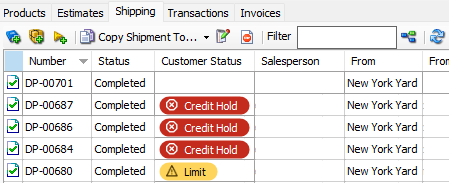
If a customer is on a credit hold, that information typically lives in your accounting program and isn’t visible to the people creating deliveries in Quantify® By the time the credit hold reaches the person creating the shipment, the equipment is already out the door.
Quantify’s Customer Statuses feature closes that gap.
Quantify lets you add color-coded account statuses to your customers. Each status carries a rule that applies to any shipment or sale: allow it through, warn the user before saving, or block it from saving the transaction. Your billing team or operations manager sets the status once and Quantify enforces it for everyone. The credit hold is clearly visible to any user working in Quantify, whether they’re at the main office or a branch.
The color labels are fully customizable. If the label on your red status, for example, doesn’t fit the language your team uses, rename it to something that does: “Customer in arrears,” “Credit hold,” or any term that you use in your workflow. The underlying allow, warn, or block behavior stays in place regardless of what you call it.
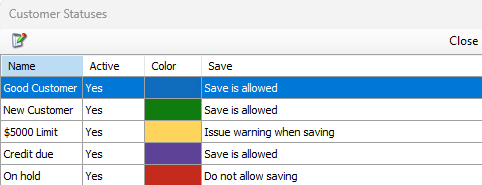
Customer status is available through the REST API, so you can push status updates from your accounting system directly into Quantify. When an account’s standing changes in one place, Quantify can reflect it automatically, with no manual updates in two systems.
You can also see the Customer Status field in reports, such as Pivot Reports. Filter your customer list by status to see which accounts are on hold and understand where your exposure sits, without reconstructing the picture by hand.
Want to see how Customer Statuses work in Quantify? Check out our help docs
While manual counts resets the baseline, “drift” begins the moment operations resume, creating a widening gap between system records and… Read More
While manual counts resets the baseline, “drift” begins the moment operations resume, creating a widening gap between system records and… Read More

The NASC Skills Gap Report 2026 has put a number on something every scaffold business owner in the UK already… Read More